

Every writer has had this daydream at some point: the manuscript is finished, the last full stop is typed, and somewhere between saving the file and closing the laptop, a small voice asks, now what? For most of publishing’s history, the honest answer was expensive, slow, and involved a great many rejection letters. That has changed more than most people realise. You can publish a book in India today, in both print and digital form, without spending a single rupee on the process itself. Not “cheap.” Not “affordable.” Free, in the specific and slightly suspicious sense that word deserves when it shows up next to “publishing.”

It’s a full pipeline, made of government portals, self-publishing platforms, and a bit of patience. Here is what it actually looks like, cost by cost and step by step.
Step 1: Get an ISBN, and don’t pay anyone for it
An ISBN, that thirteen-digit code stamped on every book’s back cover, is how bookstores, libraries, and distributors tell your book apart from every other book on earth. In India, it is issued entirely free of charge by the Raja Rammohun Roy National Agency for ISBN, a government body under the Ministry of Education. You register on the portal, submit your details as an author or self-publisher, upload your identity proof like an Aadhaar or PAN card, and wait. The first application typically gets you a block of ten ISBNs at once, which covers you for a while if you’re planning more than one book or more than one format.

Courtesy: Notion Press
The catch, if you can call it that, is time. The process can take anywhere from a few weeks to a couple of months depending on how backed up the agency is. Several self-publishing platforms will happily sell you an ISBN for a fee, and you are under no obligation to buy one from them. If a service is charging you for something the government hands out for free, that is worth knowing before you pay.
Step 2: Copyright is already yours, but register it anyway
Here’s something most new authors don’t know: copyright in India exists automatically the moment you write something down. You don’t need to register anything for the law to recognise the work as yours. What registration gives you is legal proof, the kind a court will accept if someone ever lifts your chapters wholesale and claims them as their own.
Courtesy: Sweet ‘N Spicy Designs
Registration happens through copyright.gov.in using something called Form XIV, and for an individual author registering a literary work, the government fee is a modest ₹500. The process involves a mandatory thirty-day objection window followed by examination, so budget two to six months before you get your certificate. It’s not instant, but ₹500 for a lifetime-plus-sixty-years of documented ownership is not a bad trade.
Step 3: Choose your digital route
Courtesy: Amazon KDP
For ebooks, Amazon Kindle Direct Publishing remains the default starting point, mostly because Indian readers already live on Amazon. Publishing costs nothing. On Amazon.in, the 70% royalty band applies to books priced roughly between ₹99 and ₹999, and it requires enrolling your ebook in KDP Select. Outside that band, or without KDP Select, you fall to the 35% rate. The 70% band also deducts a small delivery fee based on your file size, so a bloated manuscript with too many images can quietly eat into your margin.
Google Play Books and Draft2Digital round out the free digital options, both letting you keep full rights and both charging nothing to list your ebook.
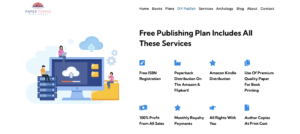
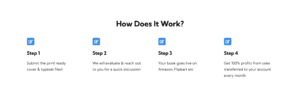
Closer to home, Paper Towns runs its own free DIY plan for exactly this. Send over a print-ready cover and typeset file, and the team gets your paperback listed on Amazon and Flipkart, with Kindle distribution included, ISBN and all. The structure is different from a typical royalty split too: authors keep 100% of the profit on every sale, not a percentage of it, with payouts monthly. The one real cost is a one-time ₹3999 (excluding GST) fee for the end-to-end process, printing till distribution. It supports all languages as long as you have a print-ready manuscript.

Courtesy: Paper Towns
Step 4: Choose your print route
Print-on-demand means nobody prints a single copy until someone actually orders one, so there’s no warehouse of unsold stock sitting in your garage. Amazon’s KDP Print calculates paperback royalties as 60% of your list price minus the printing cost, and that printing cost, charged in rupees on Amazon.in, depends on page count and rises steadily the longer your book gets.
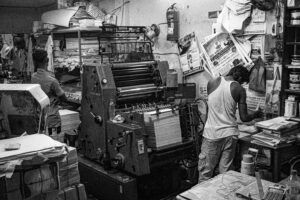
Pothi.com, an India-based print-on-demand platform, is worth knowing about specifically because it prints and ships domestically, which keeps costs meaningfully lower than routing everything through a US-based supply chain. It has no minimum order size, distributes through Flipkart and Amazon as well as its own store, and is built with first-time Indian authors in mind.
The Honest Profit Breakdown
Say you publish a 250-page paperback at ₹299 on Amazon. After Amazon’s cut and the printing cost, you might see somewhere between ₹40 and ₹70 per copy, depending on your exact pricing and distribution choices. An ebook priced at ₹199 and sitting in the 70% royalty band, once enrolled in KDP Select, earns roughly ₹139 per sale before the file-size delivery fee. It is not, for almost anyone, a living. It is, for the right book, a real number that grows with every reader who tells another reader about it.
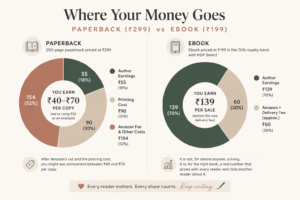
The honest arithmetic of self-publishing is this: the platforms cost nothing, but they also don’t do your marketing, your editing, or your cover design for free. Those remain your job, or an expense you choose to take on separately.
Tips
A finished manuscript is a strange, private thing to carry around, and there’s a particular kind of vertigo in watching it become a public object with a barcode and a price tag. The good news is that most of what makes a book feel ready doesn’t actually cost anything, it just takes a bit of patience and the right kind of help. Here are some tips so that you don’t feel alone.
- Hand your draft to two or three trusted readers and ask a specific question: where did you get bored, where were you confused.
- Run it through Grammarly or the Hemingway Editor to catch typos and tangled sentences, and read the whole thing aloud once, since silent reading misses more than you’d think.
- Build your cover on Canva, sticking to the exact spine and trim measurements your platform gives you.
- Once the book is live, a well-tagged Goodreads page and a couple of Bookstagram accounts willing to review an early copy will do more for word of mouth than most people expect from something that costs nothing.
Now no one can stop you from publishing that book sitting on your desktop. Just trust yourself and go for it.
Still not convinced? Here are some popular self-publishing myths busted!


BOOKS that can be published for FREE as well !!!! It’s so amazing that we have certain websites which would help an author publish a book for free. This blog is gonna help and even amaze so many writers/authors who have a book written but hasn’t been published yet.
And I absolutely loved that you even gave a breakdown of everything at the end cause that somewhat summarised your blog lil bit and even help understand how the finance works.
This blog taught me that books can be published for free as well and that too while sitting in your room